

Key takeaways
- Every GTA 6 video shares the same logo, the same map and the same two leads, so the logo never sets a video apart. Half of these 24 thumbnails show it, half don't bother.
- Guides and opinion videos use words; gameplay videos mostly don't. 11 of the 12 guides, reviews and opinion videos add a headline. 8 of the 12 gameplay and challenge videos have none.
- Two channels used the exact same headline, "DON'T FINISH CHAPTER 1!", and two more used almost the same gameplay shot with opposite words on it. In a one-game feed, the difference is in the promise, not the picture.
- Money is the stake. Four frames put a dollar figure on the screen, from a bank balance struck through to $0 to a vault counter at $4,000,000.
- Two of the three most-watched uploads that aren't live streams show a creator holding the PS5 box, and nothing else from the game.
- Views do not prove a thumbnail caused them. Borrow the structure, never the image, and test your own version.
GTA 6 is the biggest game launch in years, and that creates a strange problem for anyone making videos about it. Every thumbnail in your viewer's feed is about the same game. The same Vice City skyline, the same pink-and-purple logo, the same Lucia and Jason. Whatever you upload tonight will sit between a streamer with tens of millions of views and a dozen guide channels answering the same questions.
So we went and looked. We pulled this week's most-watched GTA 6 videos from YouTube, from English-speaking channels, and picked 24 thumbnails that each do something different. They are all in the trending GTA 6 thumbnails gallery, which gets new picks every day. This article is the long version: what is in each frame, why it works in a feed where everyone shares the same subject, and what you can take for your own video.
If you need the thumbnail for tonight's upload rather than a theory of thumbnails, Thumblore's GTA 6 thumbnail generator makes one from a sentence describing your video. The rest of this breakdown is how to make the right call either way.
How this set was chosen, and what it cannot prove
The candidates came from two places: YouTube's US gaming trending feed, and this week's most-viewed results for a set of GTA 6 searches (gameplay, review, secrets, tips, money, map, cars, story and a few more). We kept only videos about GTA 6, from channels that list an English-speaking country (the United States, the United Kingdom, Canada, Australia, Ireland or New Zealand), which gave us 56. Then we looked at every thumbnail by eye.
We cut it to one video per channel and left out several kinds of frame: videos about leaks or piracy, frames built on sexual content (GTA gives creators plenty of that), a headline with a slur in it, uploads from Rockstar itself and from record labels, and thumbnails that are just Rockstar's cover art with a word on top, because those tell you nothing about the creator's choices. The order in the gallery and below is our editorial judgement. It is not YouTube's ranking and it does not follow the view counts.
The usual warning applies, and it matters more than usual here. A view count does not prove a thumbnail caused those views. In launch week, the channel's size and how early the video went up count for an enormous amount. A creator with a huge audience who streamed GTA 6 on day one would have pulled millions of views with almost any frame. The number that measures a thumbnail's pull is impressions click-through rate, and only the creator can see it. So nothing below claims a design choice earned a result. It describes what the frames do.
Borrow the structure, not the image
Every thumbnail here belongs to the creator named under it, and the game's artwork and logo belong to Rockstar. Take the layout, the framing and the kind of promise, and build your own picture from your own gameplay. Our thumbnail copyright guide covers where the lines sit.
The whole set at a glance
The pattern column is our own classification into six layouts. "Real face" means a photographed creator, not a game character. "Added words" means type laid over the image, not the game's own HUD.
| # | Channel | Video type | Pattern | Real face | Added words |
|---|---|---|---|---|---|
| 1 | IShowSpeed | Launch stream | Reaction | Yes | DAY 1 |
| 2 | MrBeast Gaming | Challenge | Reveal | Yes | None |
| 3 | CoryxKenshin | Let's play | Reveal | Yes | None |
| 4 | TmarTn2 | Gameplay | Reveal | No | None |
| 5 | IGN | Review | Number | No | REVIEW, 10 |
| 6 | LazarBeam | Challenge | Reaction | Yes | None |
| 7 | gameranx | Buyer's guide | Warning | No | BEFORE YOU BUY |
| 8 | Zynxize | Funny moments | Reveal | No | Arrow only |
| 9 | T5G | Details list | Before / After | No | TODAY, 2 WEEKS |
| 10 | Linus Tech Tips | Console comparison | Versus | Yes | 100" TVs |
| 11 | Vexies | Mistakes guide | Warning | No | DON'T FINISH CHAPTER 1! |
| 12 | BiggySweats | Tips guide | Warning | No | DON'T FINISH CHAPTER 1! |
| 13 | MELOO | Heist gameplay | Number | No | None (HUD only) |
| 14 | TimTheTatman | Launch stream | Reveal | Painted | None |
| 15 | jayvee | Starter guide | Reveal | No | None |
| 16 | Gaming with Griff Griffin | Mechanics guide | Before / After | No | SHOOT THIS |
| 17 | NOT Eight Thoughts | Opinion | Versus | No | ADVERTISING, REALITY |
| 18 | IAmBeanz | Opinion | Warning | No | (IT ISN'T JUST YOU) |
| 19 | TGG | Launch stream | Reveal | No | LAUNCH STREAM |
| 20 | Vadact | Challenge | Versus | No | ME |
| 21 | JEV | Gameplay comedy | Reaction | Yes | None |
| 22 | NorZZa | Mistakes guide | Warning | No | STOP DOING THIS NOW! |
| 23 | TheGamingRevolution | Endings breakdown | Number | No | ALL 15 ENDINGS |
| 24 | H2ODelirious | Series episode | Reaction | Cartoon | Episode 5 |
The box in hand: launch week's simplest frame
Two of the three biggest uploads in the set that aren't live streams made the same choice, and it isn't a gameplay screenshot.
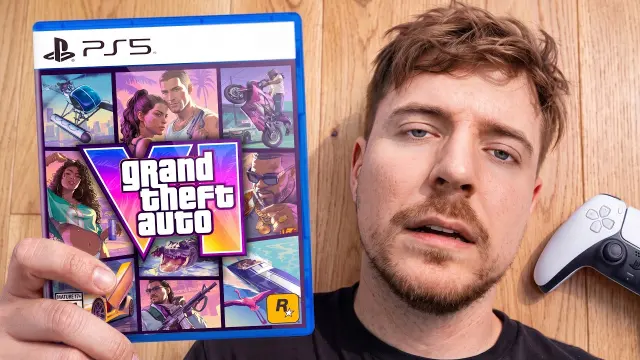
MrBeast Gaming's "I Survived 100 Hours In GTA 6" shows a deadpan face, a controller lying on a wooden floor and the boxed PS5 case held up to the lens. No headline, no explosion, no Vice City. The title does the explaining. The thumbnail just shows possession.
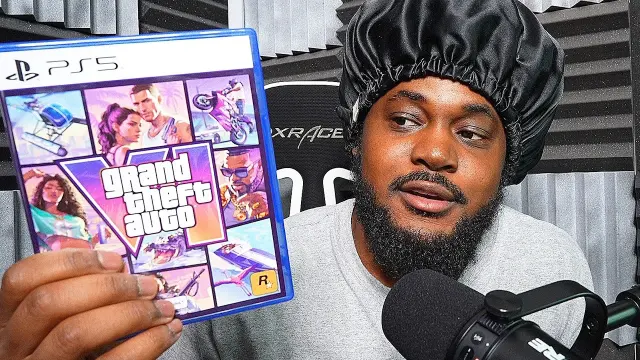
CoryxKenshin went further: his title is only "GTA 6", and his thumbnail is the same idea, the case held up beside a calm face in a satin bonnet, with a microphone in shot. Both work for the same reason. In the first days after a launch, owning the game is the news. And both work for channels whose audience comes for the person first, which is why the face is as large as the box.
The lesson for a smaller channel is not "hold the box". It's that the simplest true statement about your video can be the strongest frame, as long as it's the thing your viewer cares about most right now. That window closes fast, which is why this pattern will vanish from the feed within weeks.
Same shot, opposite promise
Here's the clearest proof in the set that in a one-game feed, the words are what make a thumbnail yours.
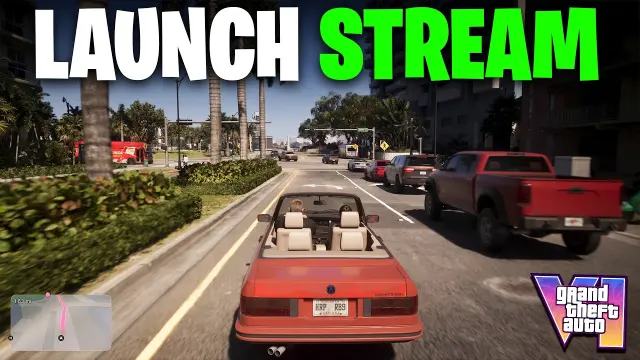
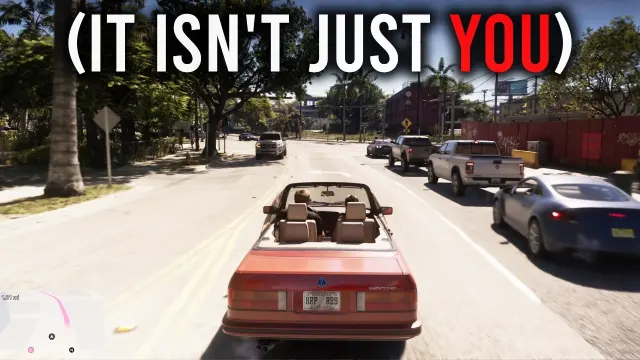
TGG and IAmBeanz used almost the same gameplay shot: a red convertible driving down a sunny street, seen from behind. TGG wrote "LAUNCH STREAM" across the top in white and green and meant "come and see it with me". IAmBeanz wrote "(IT ISN'T JUST YOU)", with YOU in red, and meant "something about this game feels wrong".
The brackets on the second one are a good touch. They make the line sound like a quiet aside, the sort of thing you'd say to a friend who'd admitted a doubt. It speaks to a feeling the viewer may already have rather than to a feature of the game. If your video has an opinion, that is often a stronger hook than anything you can screenshot.
No time to design two versions?
The point of this pair is that the same footage can carry very different promises. In Thumblore you can describe the video once, get two options back, and then change the words or the mood by chatting with it or with one-click edits, so trying "LAUNCH STREAM" against an opinion line takes minutes, not an evening. Start from the GTA 6 thumbnail generator.
Same headline, two channels
The opposite case: two different channels, the same five words.
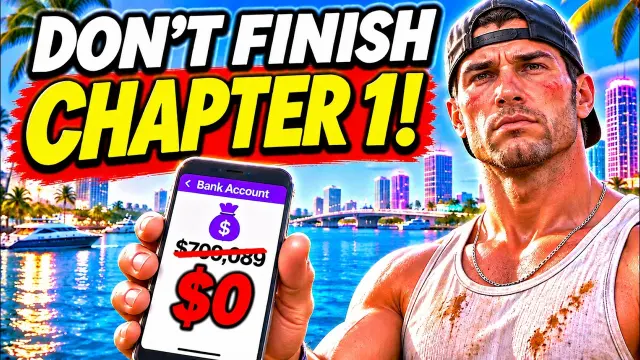
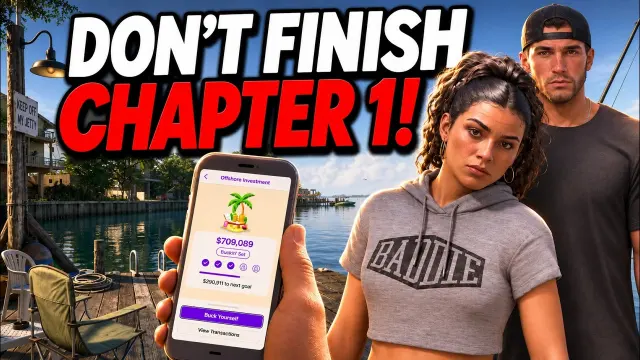
Vexies and BiggySweats both put "DON'T FINISH CHAPTER 1!" in heavy type at the top and a phone in someone's hand underneath. The difference is what's on the phone. Vexies shows a bank balance of $700,089 struck through with $0 in red: lose everything if you skip this. BiggySweats shows an offshore account climbing to $709,089: get rich if you do this. Same warning, one framed as loss and one as gain.
Interestingly, Vexies' title is about "15 Early Game Mistakes", not chapter 1. The thumbnail makes a sharper, more specific threat than the title does. That's a useful trick for list videos: pick the single most alarming item and let the thumbnail be about that.
It also shows how fast a phrase spreads in a one-game feed. Once a headline works, others pick it up within days. If yours ends up next to a near-copy, the image under the words is your only way to stand out.
Put the money on the screen
GTA is a game about money, and four frames in this set use a dollar figure as the stake.
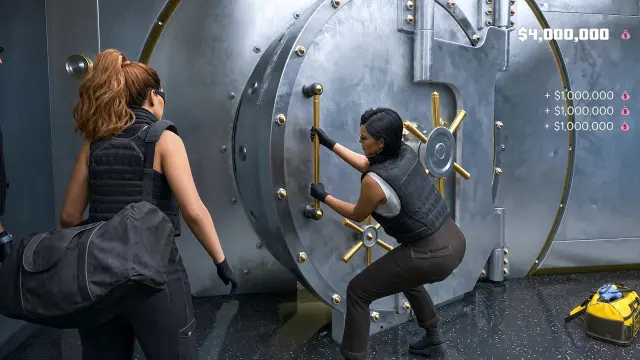
MELOO's heist video adds no headline at all. Two women in tactical vests pull at a giant vault door, and the game's own money counter in the corner reads $4,000,000, with three "+ $1,000,000" ticks beneath it. The HUD is the headline. If the game already shows the number on screen, you don't need to type it again.
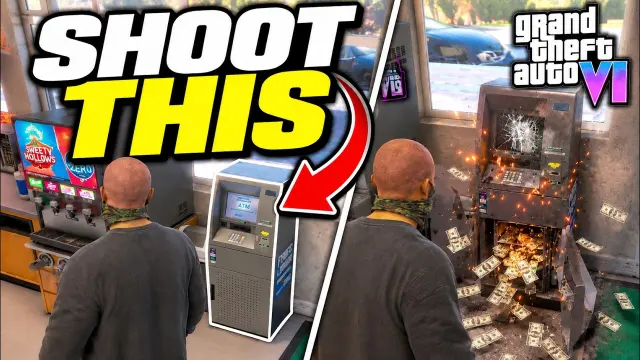
Gaming with Griff Griffin splits the frame in two. On the left, "SHOOT THIS" and a red arrow pointing at a cash machine in a convenience store. On the right, the same machine blown open and spraying notes. Instruction, then reward. For a video called "25 Hidden Mechanics", the thumbnail picks one mechanic and shows the payoff, and that is enough to make the other 24 feel worth watching.
Reviews and opinions put the verdict on the frame
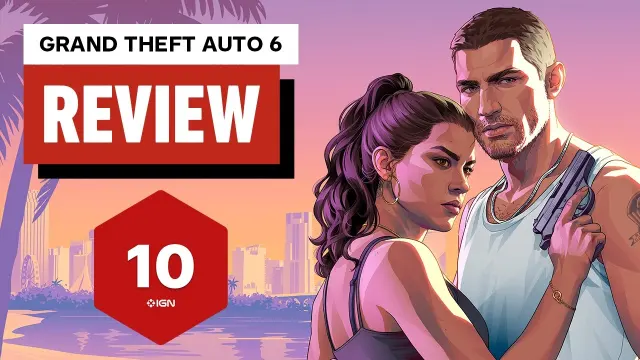
IGN's review thumbnail has one job: show the score. A red "REVIEW" banner, a red hexagon with a 10 in it, and the official artwork on the right. For a review, the verdict is the whole story, so it is printed larger than anything except the word review. Viewers who want to know whether it's good get their answer before they click and then click anyway, to find out why.
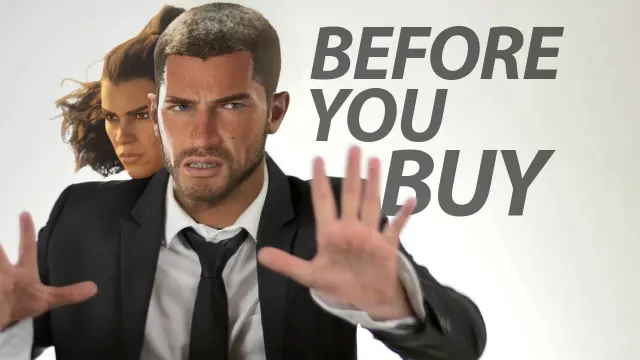
gameranx's "Before You Buy" uses a pose instead of a score. Jason in a black suit holds both hands up as if to stop you, with "BEFORE YOU BUY" in grey beside him. The pose acts out the title. It's also the channel's long-running series look, so regular viewers recognise it from across the feed.
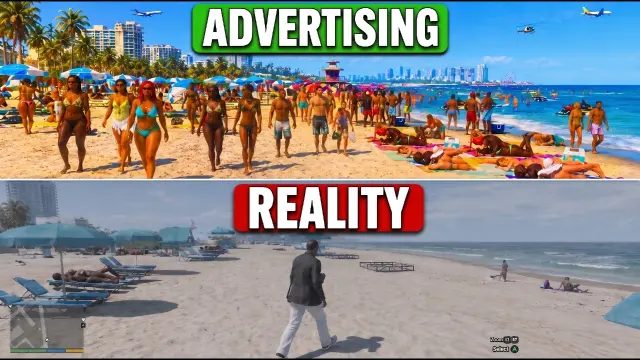
NOT Eight Thoughts takes the critical side and makes the argument in two labels. Top half: "ADVERTISING" over a packed beach. Bottom half: "REALITY" over an almost empty one. Anyone can understand the whole complaint without reading the title. That's the test of a good opinion thumbnail: could a stranger state your argument from the picture alone?
One impossible image
The gameplay and challenge videos mostly skip words and bet on a single picture that couldn't happen anywhere else.
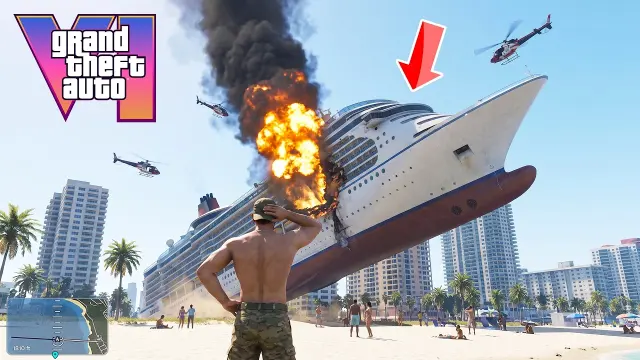
Zynxize's funny-moments compilation leads with one clip: a cruise ship run aground on the beach, its bow tilted into the sky and on fire, with helicopters circling and a shirtless man watching with his hand on his head. A compilation has dozens of moments. The thumbnail picks the most absurd and lets it stand in for the rest.
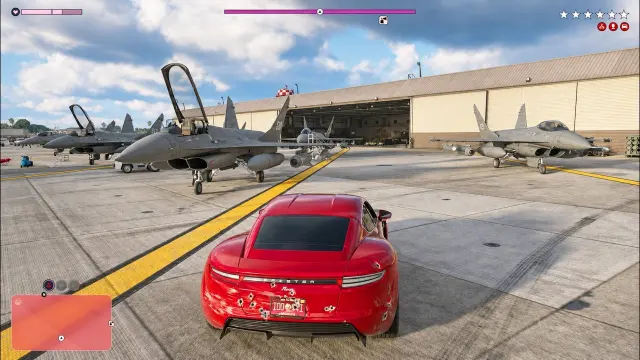
TmarTn2's is calmer but works the same way: a red sports car on a military runway facing a row of grey fighter jets. The red car is the only colour in the frame, and it reads instantly as "I'm not supposed to be here". No face and no words, and the title tells you the rest.
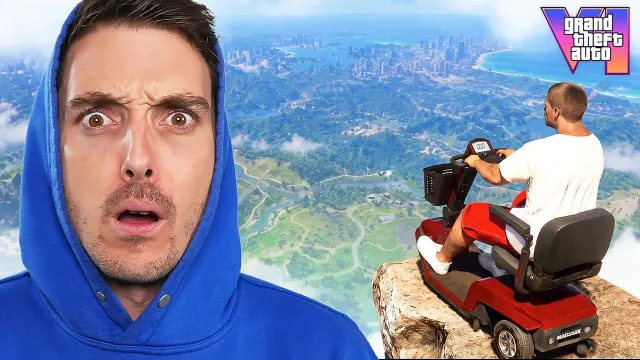
LazarBeam adds his face, wide-eyed in a blue hoodie, next to a man on a red mobility scooter parked on the edge of a rock high above the entire map. The joke is the mismatch: the least suitable vehicle in the most dangerous place. A good challenge thumbnail usually has one thing that is wrong in exactly the right way.
When the creator is the draw
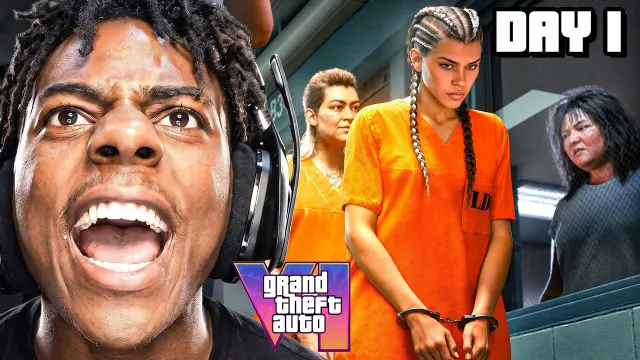
IShowSpeed's launch stream is the most-viewed video in the set, and its thumbnail is the classic streamer frame: a huge screaming face on the left, a scene from the game on the right, and "DAY 1" in the corner. The scene is a smart choice. Lucia in an orange jumpsuit and handcuffs, between two other inmates, tells you the story starts somewhere you might not have expected.
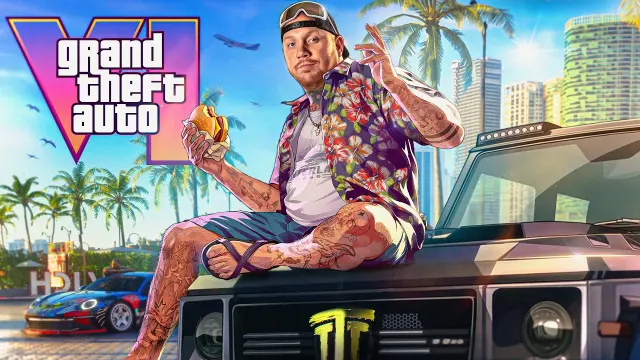
TimTheTatman did something no one else in the set did: he put himself inside the game's own painted cover style. He sits on the bonnet of a black truck with his "TT" logo on the grille, holding a burger, in a Hawaiian shirt, with palm trees and towers behind him. He isn't reacting to GTA 6. He's in it. If you have a recognisable look or a mascot, this is a strong move for a game with a famous art style, as long as the art is your own.
JEV and H2ODelirious show two more ways to use a face. JEV laughs hard beside a car flipped upright in the air, and the laugh tells you to read the chaos as comedy, not as a bug report. H2ODelirious uses a cartoon in the channel's own illustrated style, which looks nothing like the game and so never blends into a feed full of Vice City screenshots.
Prove it with one example
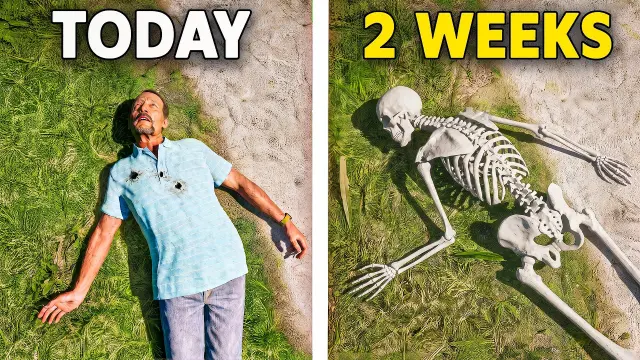
"50 INSANE Details" is a hard title to illustrate, because fifty things don't fit in a thumbnail. T5G doesn't try. Two panels: "TODAY" shows a body in the grass, "2 WEEKS" shows the same spot with only a skeleton left. One detail, shown well, proves the claim about all fifty.
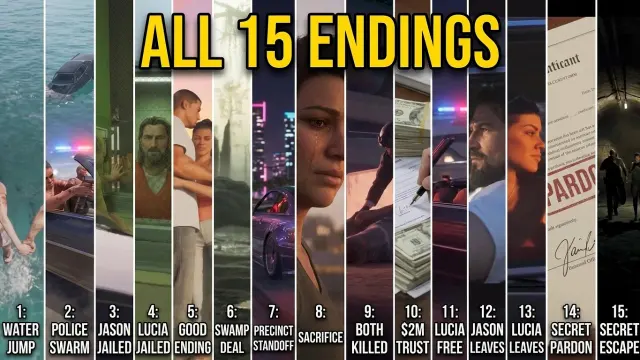
TheGamingRevolution goes the other way and turns the thumbnail into a contents page: "ALL 15 ENDINGS" over fifteen thin strips, each a scene from one ending with a numbered label. It's a bold choice, because the labels give away ending names. That suits the people the video is for, players who have finished the game, and it warns off everyone else, which keeps the wrong viewers from clicking and leaving.
What is actually true across all 24
Pulling the set together, a few things hold up:
- The logo is optional. 12 of the 24 show the GTA VI logo clearly. It tells a searcher this is the game they typed, but it can't make you stand out, because everyone has it.
- Match the words to the video type. 15 of the 24 add words. Nearly every guide, review and opinion video does; most gameplay videos don't.
- A photographed face appears in 6 of the 24, almost all from creators whose audience comes for them. Two more use drawn characters: a painted version of the streamer, and a channel's own cartoon cast.
- Specific beats general. One mechanic, one ending, one exploding ship, one bank balance. Almost no frame tries to show the whole video.
- In a one-game feed, the promise is what's yours. The same shot carried "LAUNCH STREAM" and "(IT ISN'T JUST YOU)". The same headline sat over a loss and a gain.
How to use this on your own GTA 6 video
- Name your video type first. Gameplay or challenge: try it without words and let one impossible image carry it. Guide, review or opinion: write the warning, verdict or argument on the frame.
- Pick the one thing. The single most alarming mistake, the one best clip, the one number. If you can't choose, the thumbnail will try to say everything and say nothing.
- Decide if you're the draw. If your viewers come for you, show your face at the size these streamers do. If they come for the game, a character or a scene can stand in.
- Find your promise. Look at what the top three videos for your topic already say, and say something different with the same game.
- Check it small. The free thumbnail preview tool shows your frame at real YouTube sizes, next to others.
Make your GTA 6 thumbnail with Thumblore
Everything above comes down to two decisions: what the one image is, and what the frame promises. Thumblore lets you make those decisions in words. Describe your video in a sentence and it returns two original 1280×720 options, with the layout, text and colour already worked out. Then adjust them by chatting ("make the number bigger", "swap the headline for IT ISN'T JUST YOU"), tap one spot to change just that part, or use one-click edits in 40 different ways for mood, scene, expression and lighting. Face swap puts your own face in the frame.
Copy one of these to start:
- Try: "GTA 6 money guide, hand holding a phone with a bank balance going from $0 to $1,000,000, Vice City beach behind, bold text DON'T SKIP THIS"
- Try: "GTA 6 is it worth it review, split screen with HYPE on top over a crowded beach and REALITY below over an empty street, no face"
- Try: "GTA 6 challenge, red sports car alone on a military runway in front of grey fighter jets, golden hour, no text"
Every image Thumblore makes is original, so you are never pasting Rockstar's artwork or another creator's thumbnail into your own. Try the GTA 6 thumbnail generator free.
Posting every day while GTA 6 is hot?
The creators in this set upload daily, and a daily series lives or dies on how quickly you can make the next frame. With Thumblore you keep one look and change the number, the headline or the scene each day by chatting, instead of reopening a design file. Make your first one free.
Latest additions
New GTA 6 thumbnails are added to the gallery every day, newest first, and broken down here as they arrive.
The short version
When every video in the feed is about the same game, the game can't be your hook. The GTA 6 thumbnails getting watched right now make one clear decision: a box in hand, a bank balance at zero, a cruise ship on a beach, a verdict of 10, two labels that state an argument. They borrow the game's world and add a promise of their own.
Go through the trending GTA 6 thumbnails gallery with your next upload in mind, take the one move that fits, and build your own frame around it. For the design rules, colours and layouts that suit the game, read our GTA 6 launch week thumbnail guide, or skip straight to making one with the GTA 6 thumbnail generator.